
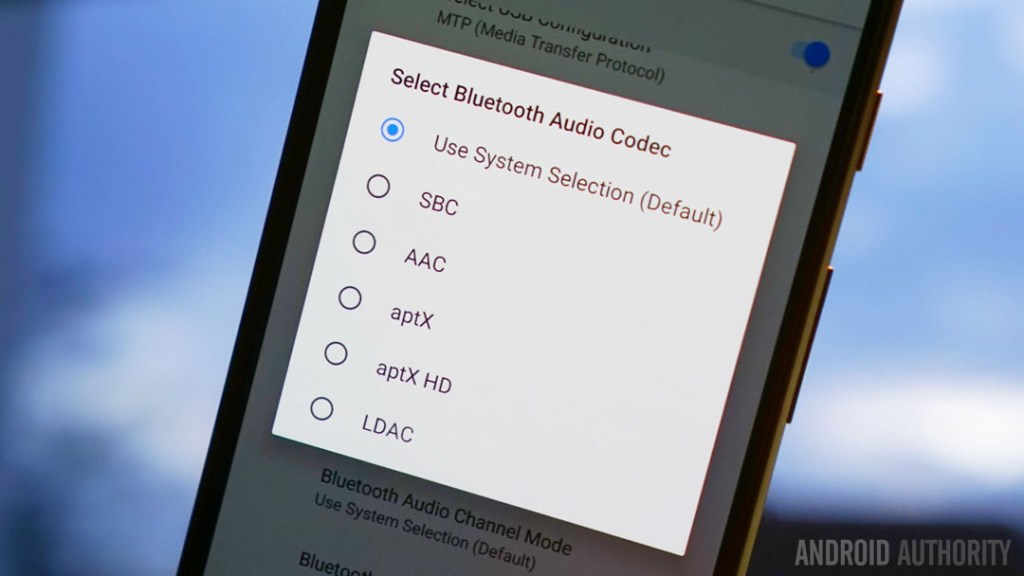
Bluetooth codecs are the technology that compresses and transmits audio from your phone to your wireless speakers, earbuds, or headphones. When a music file is compressed and transmitted wirelessly between Bluetooth devices via a Bluetooth codec, some of the song’s details are almost always lost forever in the process.
The codec your device uses affects:
- Sound Quality – Some codecs offer better clarity and detail than others.
- Latency (Delay) – Important for gaming, calls, and watching videos.
- Connection Stability – Some codecs handle interference better.
- Battery Life – Higher-quality codecs may use more power.
Contents:
Also check out;
Basic Terms
A. What is bitrate?
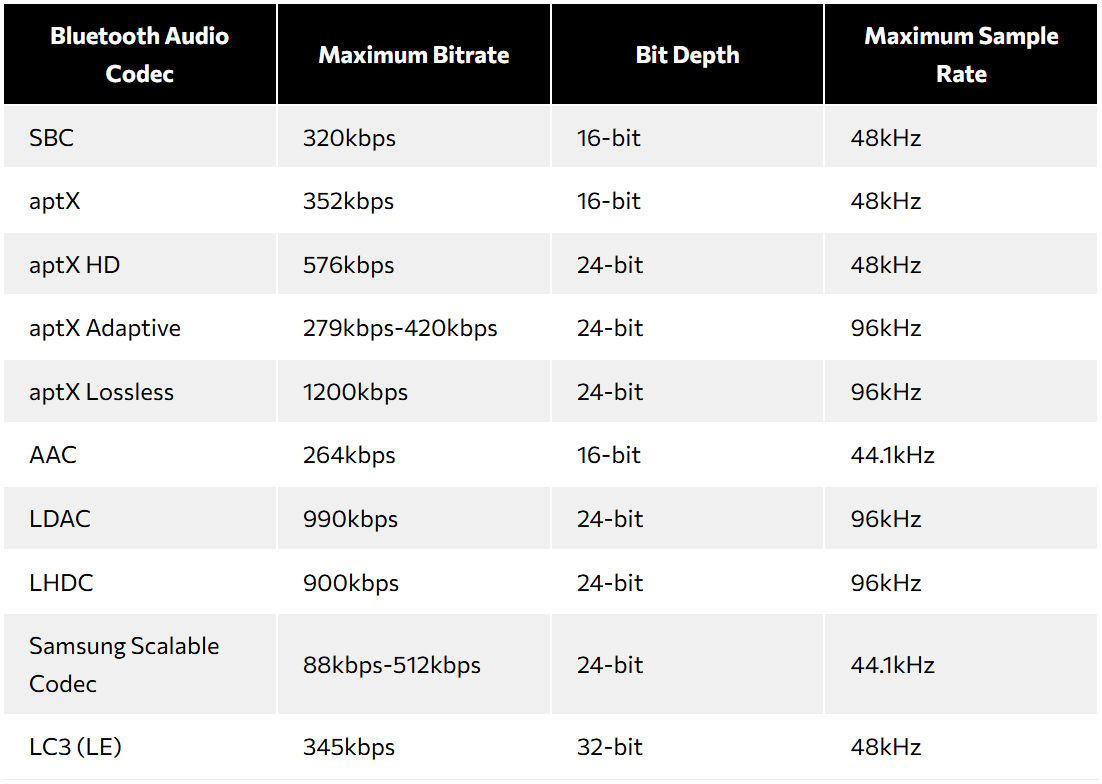
Bitrate is the rate at which data is transferred by a codec, measured in kilobits per second (kbps) or megabits per second (Mbps) in the case of the most capable codecs. The higher a codec’s bitrate, the more ‘bandwidth’ it has, meaning the more efficiently it can carry higher-quality audio without losing information.
Real-World Impact: If your connection is weak, a high-bitrate codec (like LDAC) might not work properly and will automatically lower its bitrate, reducing quality.
B. Bit Depth & Sample Rate
Bit depth refers to how much detail can be captured in each audio sample. For reference, CD quality is 16-bit and hi-res quality is typically 24-bit.
Sample rate is how many times per second the audio signal is captured. Think of it like a video’s frame rate—the higher the sample rate, the smoother the audio reproduction. CD-quality files have a sampling rate of 44.1kHz, meaning 44,100 samples were taken every second during that process. Hi-res audio files commonly have a sampling rate of 96kHz, meaning 96,000 samples were taken every second. Generally, the higher the sampling rate, the more accurate the digital recording (music file).
Real-World Impact: Bit depth and sample rate matter, but Bluetooth compression often reduces the actual benefit. The difference is hard to notice unless you have high-end headphones.
What Bluetooth codecs are available?
1. SBC (Sub band Coding)
SBC is the most basic Bluetooth codec and is supported by all Bluetooth audio devices. It was designed to ensure compatibility, not high-quality audio. It is widely supported but has a lower audio quality compared to advanced codecs and has a higher latency, which makes it less ideal for gaming and videos.
2. AAC (Advanced Audio Codec)
AAC is a more advanced codec than SBC and is the default codec for Apple devices (iPhones, iPads). Although Android supports AAC, its performance is historically underwhelming because of inconsistent streaming quality. Your mileage may vary depending on your Android smartphone when streaming over AAC. It works well for music streaming apps like Apple Music, YouTube Music, and Spotify since they also use AAC.
3. aptX
aptX is a Bluetooth codec developed by Qualcomm designed to offer better sound quality than SBC with lower latency. It is commonly found on Android phones and certain wireless headphones, but not supported by Apple devices. It offers better audio quality and lower latency, but requires both the phone and headphones to support aptX. If either device lacks support, it defaults to SBC.
4. aptX HD
aptX HD (released in 2016) is an upgraded version of aptX designed for higher audio quality with better detail and clarity. It is mainly found in premium wireless headphones and Android devices. Like aptX, it is not supported on iPhones. It requires both phone and headphones to support aptX HD, otherwise, it falls back to aptX or SBC.
5. aptX Adaptive
aptX Adaptive is Qualcomm’s most advanced aptX codec (released in 2018), designed to dynamically adjust quality and latency based on connection strength and usage. It is available on many Android devices and high-end wireless earbuds/headphones. But it’s not supported on iPhones.
6. aptX Lossless
aptX Lossless is the first truly lossless Bluetooth codec from Qualcomm, designed to deliver CD-quality audio (16-bit/44.1kHz) with no compression loss. aptX Lossless also supports 24-bit audio at 48kHz or 96kHz, and while 16-bit audio can still be considered high-quality, 24-bit lossless provides a more detailed and accurate representation of the original source, preserving more nuance in the sound.
aptX Lossless is part of the aptX Adaptive family but can switch to a fully lossless mode when conditions allow. It is not supported on iPhones and only works on select Qualcomm Snapdragon Sound-certified devices.
7. Samsung Scalable Codec
Samsung Scalable Codec (SSC) is a proprietary Bluetooth codec designed specifically for Samsung Galaxy devices and Galaxy Buds. Like the beloved aptX Adaptive codec, these codecs are variable (88-512kbps). It dynamically adjusts the bitrate for better connection stability and audio quality.
Note: When you pair any Samsung Galaxy Buds with a non-Samsung phone, they use the SBC and AAC Bluetooth codecs.
In 2022, Samsung updated and renamed the Samsung Scalable Codec to the Samsung Seamless Codec. The 1 biggest change includes an increased sample rate (44.1kHz to 48 kHz).
8. LDAC
LDAC is a Bluetooth codec developed by Sony that supports higher bitrates and better audio quality than most other codecs. Unlike aptX Adaptive, which focuses on balancing quality and latency, LDAC prioritizes high-resolution audio streaming. It is supported on many Android devices but not on iPhones. While LDAC can provide high-quality audio, it’s generally not considered the best choice for gaming due to its potential for higher latency compared to other codecs like aptX Adaptive.
LDAC 330kbps tends to be more stable than the 660kbps and 990kbps options but does offer lower sound quality. Therefore, many devices will default to the 330kbps mode. You can force the higher bitrate options through your Android phone’s Developer Options. But both aptX and SBC outperform LDAC when it streams at 330kbps, which is the default chosen by many phones. In order to change this, you have to enter developer settings and enable a setting called “Best effort”.
9. LHDC (Low Latency High-Definition Codec)
LHDC is a Bluetooth codec designed for high-resolution audio streaming. LHDC can be a suitable alternative to high-definition audio codecs like LDAC and aptX HD/Adaptive depending on your use case. But compared to LDAC, LHDC actually performs better in terms of low-latency audio.
Another codec, the low-latency audio codec (LLAC/LHDC LL), is a viable alternative to LHDC. It has very low latency (30ms) and supports 400/600kbps bitrates at up to 24-bit/48kHz. Another one announced in December 2022, LHDC-V (aka LHDC 5.0) ups the audio resolution to 24-bit/192kHz at 1Mbps.
10. LC3
Bluetooth LC3 is a relatively recent addition intended to serve as a sequel to the dated SBC codec. It offers more efficient transmission and higher quality audio. Like aptX Adaptive and Samsung’s codecs, LC3 is a scalable codec that adjusts the bitrate to maintain a stable connection.
The first wave of LC3-supporting devices has launched, but because both the source device and what you listen through need to support LC3, it’s still a way off from being a mainstream proposition.
Common Misconceptions About Bluetooth Codecs
1. Higher Bitrate Always Means Better Sound Quality
While a higher bitrate (like LDAC at 990kbps) can technically provide better audio quality, the real-world difference depends on how well the codec is implemented and whether the headphones can actually reproduce that detail. If the connection is unstable, the bitrate may drop, making the audio sound bad.
2. The Same Codec Sounds the Same on All Devices
Even if two devices support the same codec (e.g., AAC or aptX), they might not sound the same. The quality depends on how well the phone and headphones process the codec. Even if your phone and headphones support the same codec, their hardware, software optimization, and Bluetooth chipsets will influence how good (or bad) the final sound is.
3. LDAC Always Sounds Better Than SBC
LDAC has a much higher bitrate than SBC, but in real-world use, it often switches to a lower bitrate (330kbps) to maintain a stable connection, especially in crowded areas. If the connection isn’t strong, even a high-quality codec can sound bad than a lower-bitrate one with better stability.
4. Codecs Alone Determine Audio Quality
A codec is just one part of the audio chain. The drivers in your headphones, the DAC (digital-to-analog converter), and the overall tuning play a huge role in how your music sounds. Even with the best codec, bad-quality headphones won’t sound great.
How to tell what Bluetooth codec your devices supports?
The simplest way to tell what Bluetooth codecs your device supports is by looking at its product page on the manufacturer’s official website – it will often be listed in the technical specifications.
Also, while you may have both a phone and a pair of headphones that support, say, LDAC, you should check that the codec is indeed being used when the two are connected. To do this, you can go to your phone’s Bluetooth settings menu and select the connected headphone/speaker.
If your Android phone and connected device support multiple codecs and you want to switch between them or change from the default selection, you can do that on the phone, by entering Settings > System > select Developer options* > select Bluetooth audio codec.
*you must enter developer mode first, by going into Settings > About phone > tapping Build number seven times.
iPhones only support AAC and SBC, though you cannot switch between them.
Takeaway
Bluetooth codecs are essential for determining the audio quality and latency when streaming music or taking calls on Bluetooth devices like headphones, speakers, and smartphones. Here’s a summary of what we’ve covered:
- Bluetooth codec directly influences audio clarity, stability, and battery life.
- Some prioritize high-quality audio (LDAC, LHDC, aptX HD), while others focus on low latency and efficiency (SBC, AAC, aptX Adaptive, LC3).
- Having a high-quality codec doesn’t guarantee high-quality music—if the connection is weak, your device will fall back to a lower codec.
- Always check which codec is active when pairing your Bluetooth device, as some devices may default to a lower-quality option.
- To summarize, aptX HD and LDAC are Android users best codecs. Meanwhile, iPhone users should stick to AAC supported headphones.



Leave a Reply