

Not sure what 60%, 75%, or TKL keyboards mean? This guide explains all keyboard sizes and layouts in a simple, easy-to-understand way—so you can choose the right one for your setup without the confusion.
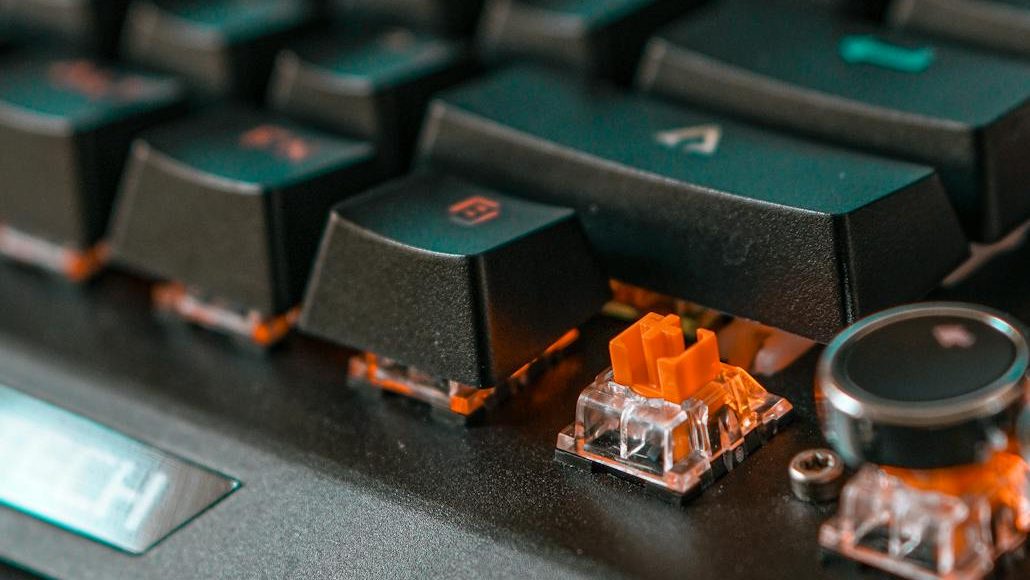

Understanding Keyboard Form Factors and Layouts
Before diving into the different keyboard sizes, it’s important to understand a couple of key terms. This will make it much easier to follow along as we explore each type.
- Form Factor:
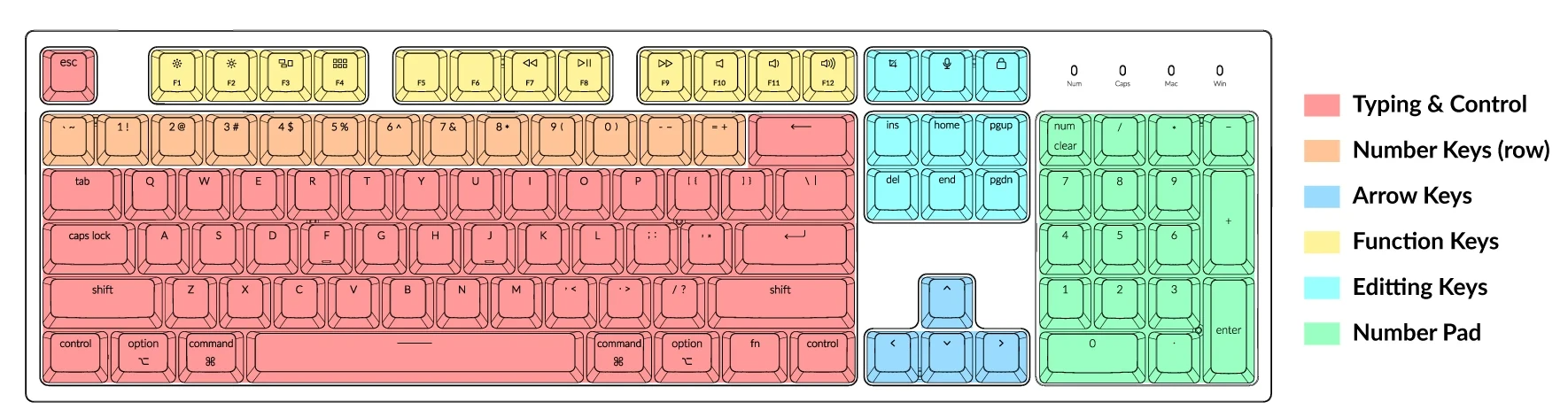
The keyboard form factor refers to its overall size and physical shape. Depending on the form factor you choose, you may lose or gain certain groups of keys, such as the number pad, function row, or navigation keys.
- Layout:
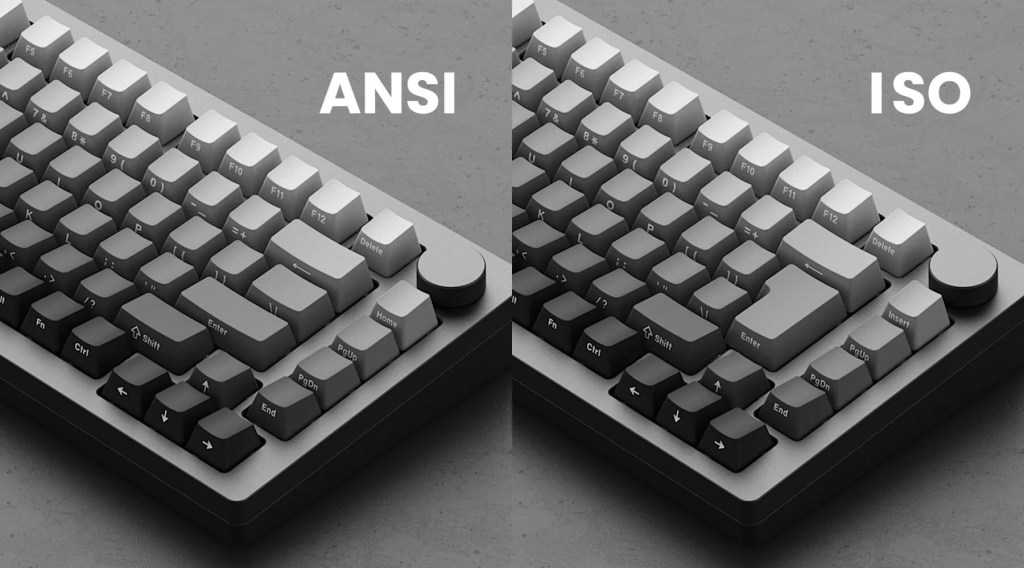
The keyboard layout refers to the arrangement, size, and positioning of keys within a given form factor. In India, the two most common layouts are ANSI and ISO. These layouts differ in key shapes (like the Enter key), spacing, and overall key placement, which can slightly affect both typing feel and appearance.
What are the different Keyboard sizes available today?
Now that you understand what form factors and layouts mean, let’s take a look at the different keyboard sizes available today and what each one offers.
Full-size keyboards
The full-size keyboard is what most people picture when they hear the word “keyboard.” It includes every standard key (all 104 Keys) found on a traditional layout.
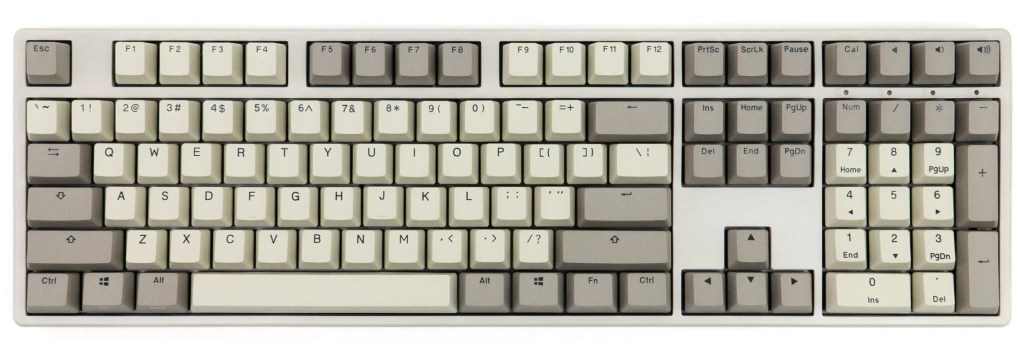
- Missing Keys: None
- Best for: Office work, data entry, general use, gaming
96% / 99% Keyboard (Compact full-size)
96% and 99% keyboards are often grouped together because they aim to deliver a full-size experience in a more compact form factor. Both layouts retain most (if not all) of the keys found on a standard full-size keyboard. The main difference lies in how the layout is optimized for space.
- 96% keyboard layout:
A 96% layout, typically removes the extra spacing between key clusters, and may remove or combine a few less-used keys into the numpad or function (Fn) combinations rather than having dedicated keys.
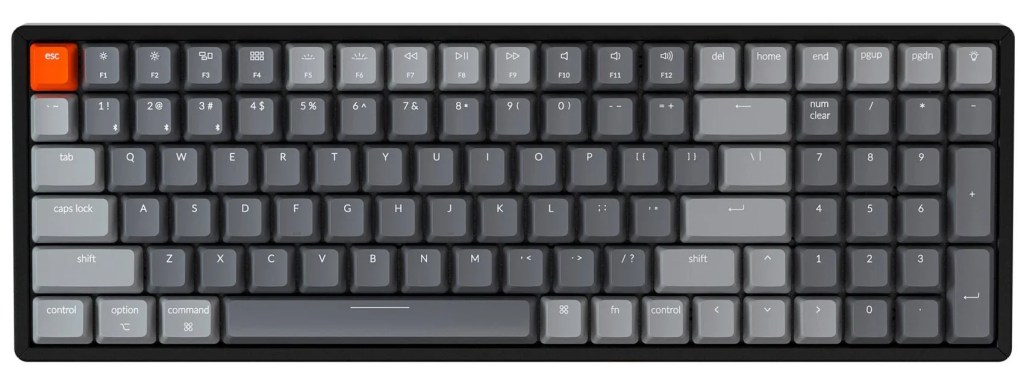
- 99% keyboard layout:
A 99% layout, on the other hand, usually (although not always) keeps all standard key functions intact, but rearranges them into a tighter layout.
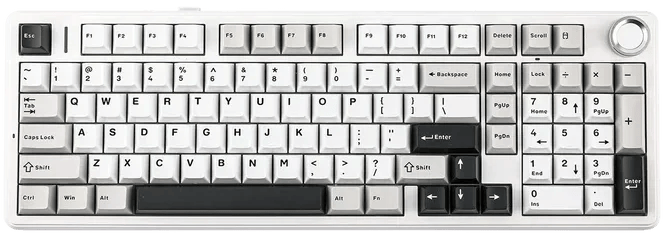
While 96% and 99% keyboards may seem very similar, the difference between them isn’t strictly defined. In fact, these terms are often used interchangeably by different brands.
It’s important to note that these terms are not strictly standardized, and the exact layout can vary depending on the keyboard manufacturer. Because there’s no universal standard, the naming is often more about marketing than strict technical differences.
- Missing Keys: None or a few dedicated editing keys (varies by model)
- Best for: Users who want a full-size keyboard in a more compact and space-efficient design
80% | Tenkeyless Keyboard (TKL)
A Tenkeyless (TKL) keyboard removes the numpad, making the keyboard more compact while still retaining most of the essential keys.
Personally, I prefer TKL keyboards for a few reasons. Since there’s no numpad, I can position the keyboard more centrally in front of me, instead of pushing it slightly to the left and typing at an angle. This makes the setup feel more natural and ergonomic.
Another advantage is flexibility—if I ever need a numpad, I can always get a standalone numeric keypad. And me being left-handed, I prefer keeping the calculator towards the left side, and a TKL keyboard makes that setup much easier.
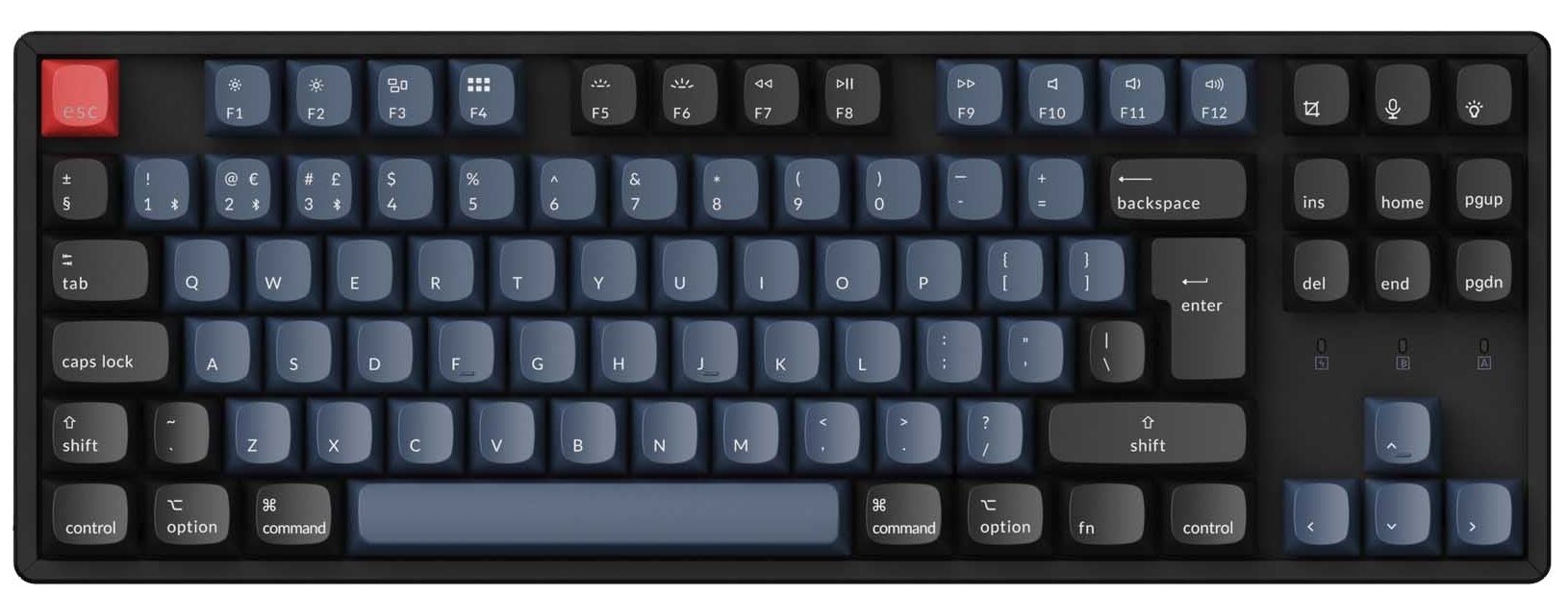
- Missing Keys: Numpad
- Best for: Gaming, general use, ergonomic setups, smaller desks
75% | Compact Tenkeyless Keyboard
Most of you will find the layout familiar, as many laptops use a 75%-style keyboard. It’s similar to a TKL layout, but more compact, with keys placed closer together and very little spacing.
When compared to a TKL layout, a 75% keyboard usually omits some editing keys above the arrow cluster. Additionally, keep in mind that the right-hand key arrangement of a 75% keyboard can differ between brands, so it’s worth double-checking the layout to avoid losing access to keys you frequently use.
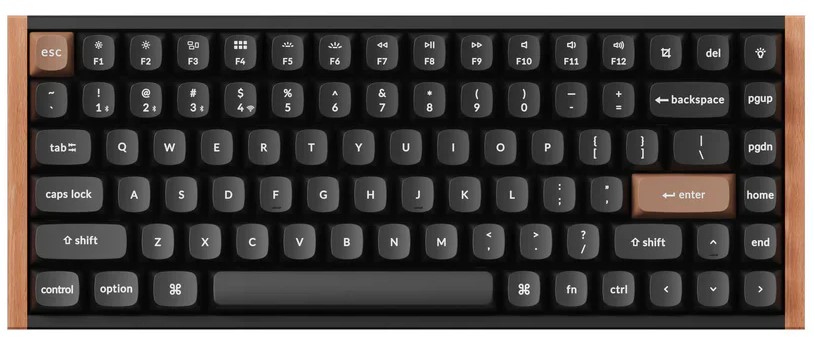
- Missing Keys: Numpad, some editing keys (Insert, PrtScn, Scroll Lock, and Pause)
- Best for: Productivity-focused users who want a compact yet functional layout
65% Keyboard
The 65% layout further reduces the number of keys to create a more compact keyboard, while still retaining some practicality.
It removes the function row, but keeps the arrow keys and a few editing keys, making it a good middle ground between compact size and usability.
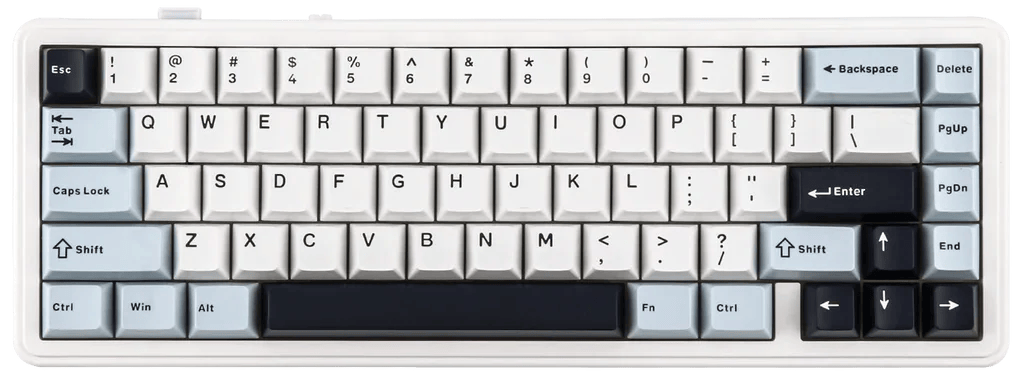
- Missing Keys: Numpad, function row, some editing keys
- Best for: Minimal setups with everyday usability, people who mainly needs to type
60% Keyboard
The 60% keyboard takes compactness even further. It removes everything to the right of the Enter key, along with the function row, leaving only the main typing keys (alphabets and number row). But you can also use function keys or arrow keys through combination keys.
By choosing a 60% keyboard, you’re stepping into a setup that prioritizes minimalism and aesthetics over pure convenience and functionality.
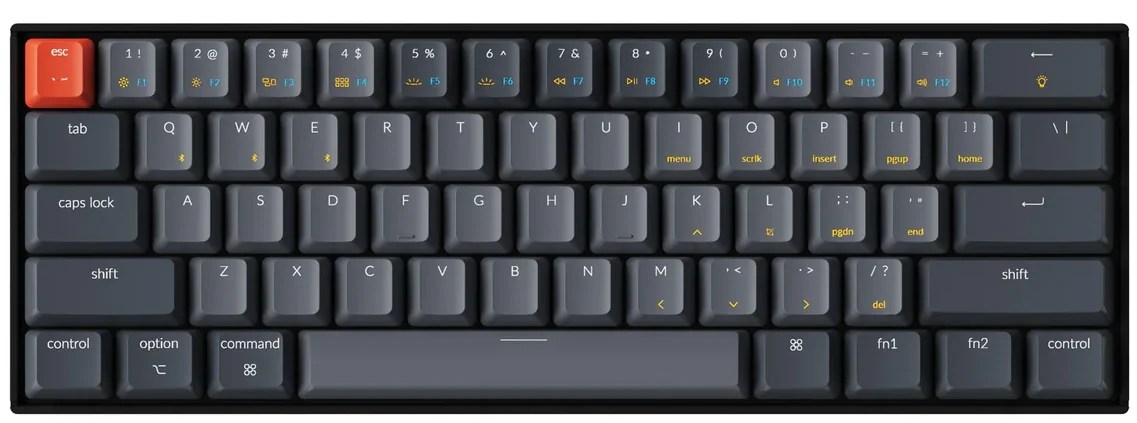
- Missing Keys: Numpad, arrow keys, function row, editing keys
- Best for: Minimalist setups, portability
Other Size or form factor Keyboards
There are several other keyboard sizes and form factors, including 40% size keyboard, split keyboard and so on. I haven’t gone into detail about them since they’re not very common and are rarely available from mainstream brands. Moreover, some of these layouts can be inconvenient for everyday use and aren’t ideal for gaming or work.
What are the different Keyboard Layouts?
Form factor isn’t the only thing that affects the keyboard’s physical features. As pointed in the intro, the layout is the physical shape and size of the keys within a particular form factor.
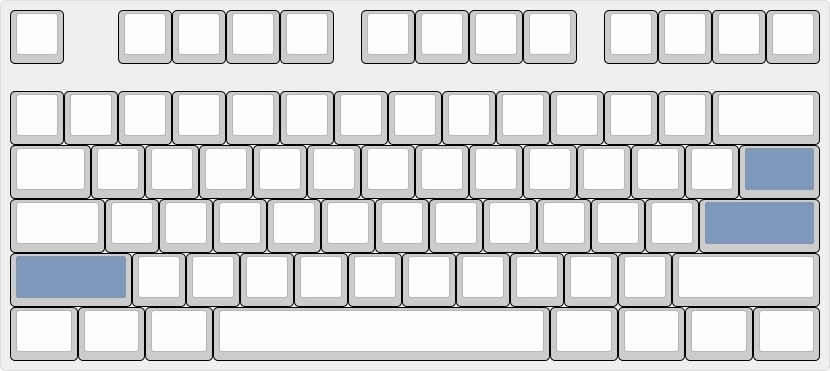
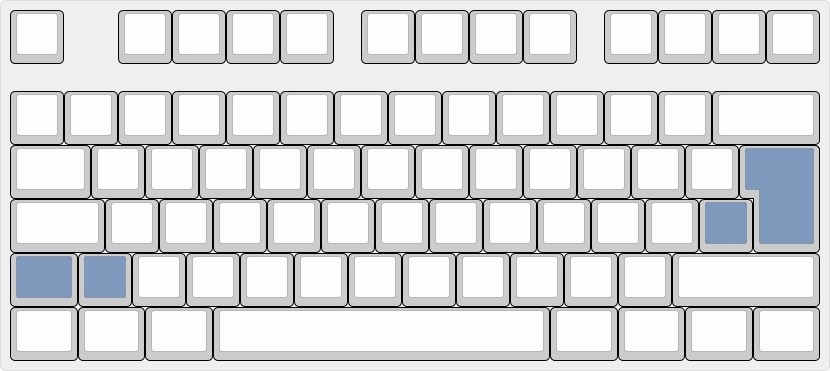
In India you will find ANSI and ISO keyboard layouts as the two most common physical layouts for keyboards. The differences between the two keyboard layouts are mainly in the size and orientation of the Enter key, the Backslash key, and the Left Shift key.
ANSI Keyboard Layout
- ANSI keyboard refers to a keyboard layout that follows American National Standards Institute established standard.
- The most notable feature of the ANSI keyboard is the wide rectangular shape (horizontal) Enter key. And the backslash key (\) is located directly above the Enter key, next to the Backspace key.
ISO Keyboard Layout
- ISO Keyboard refers to a keyboard layout standard set by the International Organization for Standardization.
- The ISO keyboard layout originated in Europe and is widely used in continental Europe and some Asian countries, such as Russia.
- ISO keyboards have an L-shaped (vertical) Enter key. And the backslash key (\ or |) is located left of the Enter key, rather than above it. And ISO keyboards have one additional key (usually near the left Shift) compared to ANSI.
ANSI vs ISO: What’s the Difference?
| ANSI Layout | ISO Layout | |
|---|---|---|
| Enter Key | Rectangular shape | L-shaped, taller key |
| Left Shift Key | Longer | Shorter with an extra key next to it |
| Backslash Key (\) | Above Enter key | Left of Enter key |
| Total Keys (Full-Size Keyboard) | 104 keys | 105 keys (extra key near left Shift) |
| Customization (Keycaps & Keyboards) | Easier to find keycaps & custom boards | Fewer keycap sets available |
Final Thoughts
Keyboard sizes and layouts may seem confusing at first, but once you understand the basics, choosing one becomes much easier.
Don’t be afraid to try different layouts—what works for someone else might not work for you. Whether you’re gaming, working, or just browsing, the right keyboard can make a noticeable difference in comfort and efficiency.
Take your time, explore your options, and build a setup that works best for you.





Leave a Reply