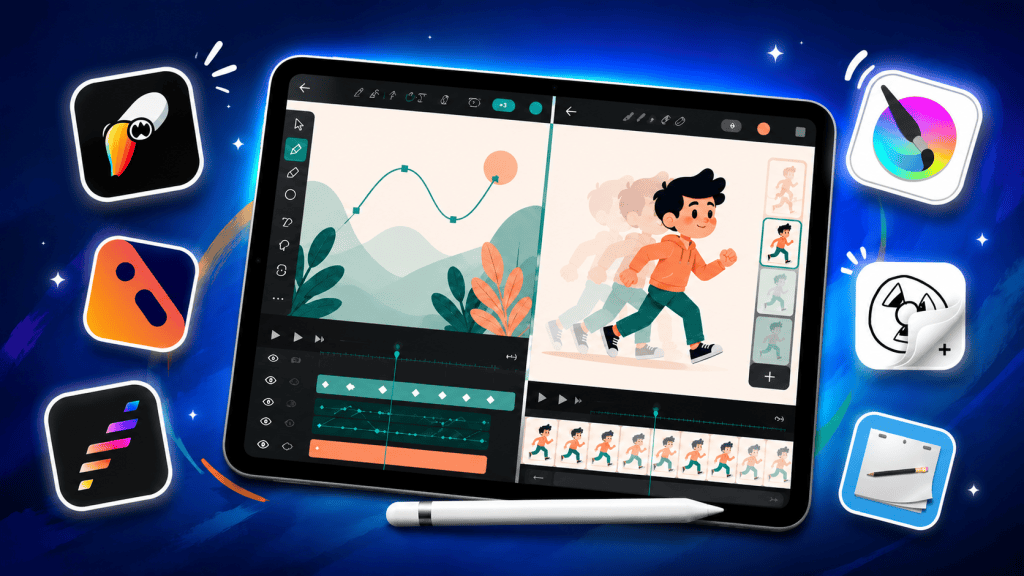
Over the last few years, mobile tablets have become powerful enough to handle serious 2D animation workflows. Whether you are learning frame-by-frame animation, creating animated YouTube content, or working on short films and animatics, there are now several excellent animation apps available on Android and iPadOS.
However, not every animation app is built for the same type of user. Some are designed for beginners who want a simple drawing and animation experience, while others offer professional timeline-based workflows that feel much closer to desktop animation software.
In this post, we’ll look at some of the best 2D animation apps available right now — including premium professional tools like Callipeg, ToonSquid, and Procreate Dreams, along with free beginner-friendly options like FlipaClip and Krita.
Paid Applications:
1. Callipeg
If your main focus is traditional frame-by-frame 2D animation, Callipeg is easily one of the best apps available on iPad today.
Unlike many beginner-oriented apps, Callipeg is designed around professional animation workflows. The app includes a full timeline interface, advanced layer management, audio support, camera movements, and powerful animation tools.
One of Callipeg’s biggest strengths is how closely it resembles desktop animation software while still feeling intuitive on a tablet. Because of this, many indie animators and animation students use it for rough animation, clean-up work, storyboarding, animatics, and even short films.
- Available on : iPadOS & Android (Beta)
2. ToonSquid
ToonSquid has quickly become one of the most popular animation apps on iPad — and for good reason.
It strikes an excellent balance between beginner accessibility and professional-level features. The interface feels cleaner and more approachable than Callipeg, while still offering advanced tools like keyframes, vector support, camera controls, and detailed timeline editing.
For many creators, ToonSquid feels like the perfect middle ground between simplicity and power. It’s capable enough for serious projects while still approachable for people new to animation.
- Available on : iPadOS only
3. Procreate Dreams
Procreate Dreams is a newer animation app built by the creators of Procreate. While it supports frame-by-frame animation, its strengths lean more toward motion graphics, cinematic animations, and stylized animated content.
The app features a very polished interface with smooth touch controls and strong Apple Pencil integration. It combines drawing, animation, audio, and effects into a modern workflow that feels very optimized for iPad users.
Compared to Callipeg or ToonSquid, Procreate Dreams focuses slightly less on traditional animation pipelines and more on creative visual storytelling and motion-based content.
- Available on : iPadOS only
4. RoughAnimator
RoughAnimator focuses heavily on traditional animation principles. The app keeps its interface relatively lightweight and straightforward while still providing the tools needed for serious frame-by-frame animation.
For animators who enjoy rough sketch animation, hand-drawn workflows, and classical animation techniques, RoughAnimator remains one of the best choices available on mobile devices. However, I’m mainly recommending it for Android users, since most of the animation apps mentioned above are only on iPadOS.
Another advantage of RoughAnimator is its cross-platform support, making it a flexible option for artists who switch between tablets and desktop systems.
- Available on : Android & iPadOS
Free Applications:
5. FlipaClip
If you’re completely new to animation, FlipaClip remains one of the best places to start.
The app is simple, lightweight, and easy to understand, making it perfect for students and casual creators who want to learn the basics of frame-by-frame animation.
Despite its beginner-friendly design, FlipaClip is surprisingly capable and has helped many creators start their animation journey. It’s especially popular among YouTube Shorts creators and younger artists.
- Available on : Android & iPadOS
6. Krita
Krita is widely known as a digital art application, but it also includes surprisingly capable 2D animation tools.
Unlike FlipaClip, Krita feels much closer to desktop creative software and offers more advanced drawing and animation features. The app is especially useful for artists who want both illustration and animation tools in a single application.
Krita is available on mobile tablets and desktop platforms, making it a great option for artists who switch between devices.
- Available on : Android
Which 2D Animation App Should You Choose?
The best animation app ultimately depends on your experience level and workflow.
- Choose FlipaClip if you are a beginner learning animation basics.
- Choose Krita if you want a powerful free app with advanced drawing tools.
- Choose RoughAnimator if you prefer a traditional frame-by-frame animation workflow and are using an Android device.
- Choose ToonSquid if you want the best balance between simplicity and professional features.
- Choose Callipeg if your focus is serious traditional 2D animation.
- Choose Procreate Dreams if you prefer motion graphics and stylized animated content.
However, if you specifically want bone rigging and puppet-style character animation, only a small number of apps currently support those features properly. Refer to the chart below for a quick comparison.
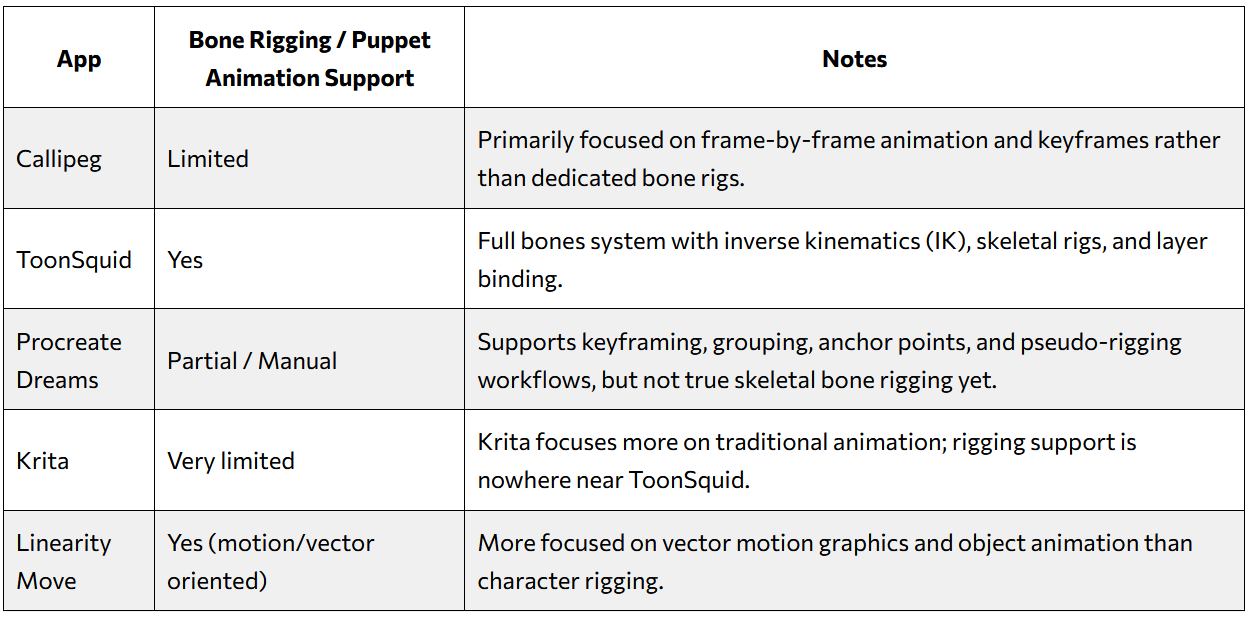
Right now, ToonSquid is easily the strongest option among these apps for actual skeletal animation and puppet-style workflows. That’s why a lot of animators now see ToonSquid as the closest thing to desktop animation software on iPad.
Overall, for serious 2D animation work, iPadOS currently offers the strongest ecosystem thanks to apps like Callipeg, ToonSquid, and Procreate Dreams. However, Android users still have excellent free options available, especially for beginners and hobbyists.
Honorable Mentions
While the apps mentioned above are some of the strongest options for 2D animation on tablets, there are also a few other great free apps worth checking out.
- Linearity Move – A modern motion design and animation app on iPadOS focused more on vector-based workflows and motion graphics. It’s a good option for creators who want smooth animated content for social media, branding, or design-focused projects.
- FlipStudio – A beginner-friendly animation app on iPadOS that offers simple drawing and frame-by-frame tools. It’s a decent option for casual users who want to experiment with animation without spending money.
- Animation Desk – One of the older and more established mobile animation apps available on Android and iOS. It offers a good balance between accessibility and useful animation tools, making it suitable for beginners and hobbyists.



Leave a Reply